On this page

Photo by Adrien Ledoux on Unsplash
Note: This is part of “Zero to Streaming Application”, learn about streaming applications building a POC. Full code here.
Motivation #
Learning something new is a positive way to spend the quarantine time we are forced in 2020. I landed on this video on youtube and decided to learn more about streaming applications in general.
I decided to build a car sharing POC myself, where clients share information in real time and messages are handled by Kafka topics. I also challenge myself by picking technologies I don’t use every day. This article is dedicated to the frontend side of the POC.
Libraries/Technologies #
Architecture #
There will be a rider client and a driver client both connected via WebSocket to a backend service, the goal is to produce and consume multiple events between the two.
Here is a list of message types the two applications will exchange.
export const ACTION_TYPE = {
  CONFIRM_TRIP: "CONFIRM_TRIP",
  END_TRIP: "END_TRIP",
  REQUEST_TRIP: "REQUEST_TRIP",
  START_TRIP: "START_TRIP",
  SYNC_STATUS: "SYNC_STATUS",
  UPDATE_DRIVER_LOCATION: "UPDATE_DRIVER_LOCATION"
};
In order to simplify development and debugging, both clients can live on the same page. Observing how the updates of one affect the other will be much easier.
The rider and driver in the same window will be tied together by a small hack, they both will share the same ID just with a different prefix
id = xxxxxxxx-xxxx-xxxx-xxxx-xxxxxxxxxxxx
const riderId = `R${id}`
const driverId = `D${id}`
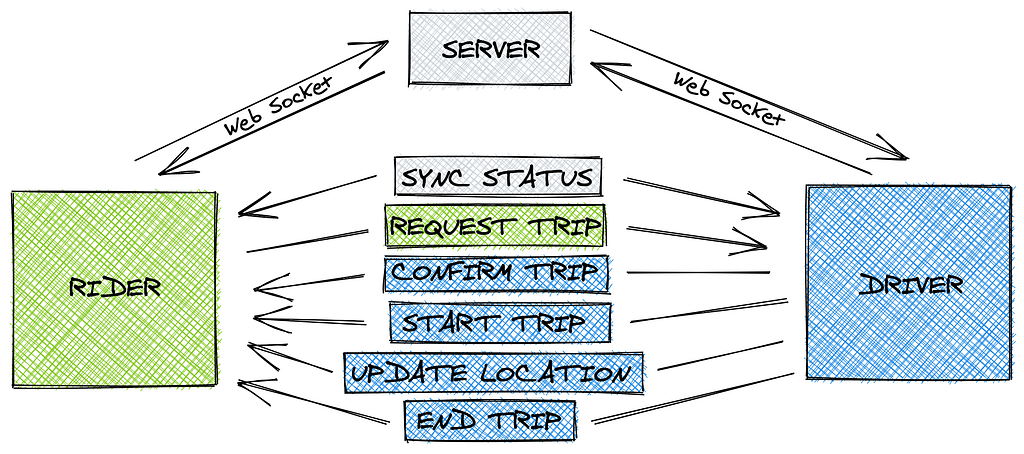
Actions flow between riders and drivers. Thanks to https://excalidraw.com/ for diagram tool
Project structure #
── frontend
    ├── package.json
    ├── public
    ├── rollup.config.js
    └── src
        ├── components
        │   ├── App.svelte
        │   ├── Driver.svelte
        │   ├── Rider.svelte
        │   └── common
        │       ├── BackCamera.svelte
        │       ├── Button.svelte
        │       ├── CenterView.svelte
        │       ├── CountDown.svelte
        │       ├── LineString.svelte
        │       ├── Map.svelte
        │       ├── Marker.svelte
        │       └── MovingMarker.svelte
        ├── main.js
        └── utils
            ├── actions.js
            ├── constants.js
            ├── mapbox.js
            └── utils.js
Driver.svelte and Rider.svelte are the 2 client applications called in App.svelte.
The common components will be shared across Rider.svelte and Driver.svelte , these are mostly plugins that consume the map context and update the map when is necessary.
Handling WebSocket Messages #
We start creating an observable from the WebSocket stream and filter the messages to the correct handler. The following gist will show the connection client-server.
onMount(async () => {
  webSocket$ = webSocket(`ws://localhost:8080/ws-rider/websocket?riderId=${getUid('RIDER')}`)
  webSocket$.multiplex(noop, noop, pathEq(['type'], ACTION_TYPE.SYNC_STATUS)).subscribe(msgHandlers.handleSyncStatus)
  webSocket$
    .multiplex(noop, noop, pathEq(['type'], ACTION_TYPE.UPDATE_DRIVER_LOCATION))
    .subscribe(msgHandlers.handleNewDriverLocation)
  webSocket$.multiplex(noop, noop, pathEq(['type'], ACTION_TYPE.START_TRIP)).subscribe(msgHandlers.handleUpdateTrip)
  webSocket$.multiplex(noop, noop, pathEq(['type'], ACTION_TYPE.CONFIRM_TRIP)).subscribe(msgHandlers.handleUpdateTrip)
})
Quoting the RxJS docs:
multiplex and it is used to simulate opening several socket connections, while in reality maintaining only one.
Pretty simple, multiplex accept as a 1st parameter a function to be called on connection event and as a 2nd parameter a function on disconnect event, they will be empty for us.
Rider Message Handlers:
const msgHandlers = {
  handleSyncStatus: async msg => {
    trip = JSON.parse(msg.payload)
    const direction = await getDirections(riderLocation, destination)
    directionsGeometry = direction.routes[0].geometry
    if (trip) driver = trip.driver
    if (!trip) webSocket$.next(Actions.rider.requestTrip({ from: riderLocation, to: destination }))
  },
  handleNewDriverLocation: async msg => {
    driver = JSON.parse(msg.payload)
    if (trip && trip.status === 'STARTED') {
      riderLocation = driver.location
    }
  },
  handleUpdateTrip: async msg => {
    trip = JSON.parse(msg.payload)
  }
}
Let’s take for example SYNC_STATUS:
- it is delivered by the server to both rider and driver clients and tells what is the current status of the trip
- In case of the rider if trip does not exist, we request one to the server sending aREQUEST_TRIP action.
- We want to draw the trip from origin to destination on the map, so we call function (mapbox service proxy) to get the directions to be drawn as lines. NB: origin and destination are 2 arbitrary location objects with latitude and longitude
Calling Mapbox api:
/**
 *
 * @params location, location1, location2.....
 *
 * @return semplified object:
 *{
 * "routes": [
 *   {
 *     "geometry": {
 *       "coordinates": [
 *         [x, y]...
 *         ],
 *       "type": "LineString"
 *     },
 *     "distance": ...,
 *     "duration": ...
 *   }
 * ]
 *}
 */
export async function getDirections(...locations) {
  const coordinatesString = locations.map(({ lon, lat }) => `${lon},${lat}`).join(';')
  const endpoint = `https://api.mapbox.com/directions/v5/mapbox/driving/${coordinatesString}?geometries=geojson&access_token=${mapbox.accessToken}`
  const resp = await (await fetch(endpoint)).json()
  return resp.data
}
you can see in the gist the example of response, the object geometry is the payload that we are looking for to be draw as line on the map.
Handling Mapbox movements #
There will be 2 types of map movements that we’ll support, the first one would be centering the map to fit the trip directions for the rider, the second would be replicate the camera view of a typical GPS navigator or far chase in the f1 video game 🏎 for the driver .
We can build the Map.svelte component using the context api and provide the map object to any inner components. Each child component can then manipulate the content or change camera settings.
<script>
  import { onMount, setContext } from 'svelte'
  import { mapbox, mapContextKey } from '../../utils/mapbox'
  setContext(mapContextKey, { getMap: () => map })
  let container
  let map
  onMount(() => {
    map = new mapbox.Map({ container, style: 'mapbox://styles/mapbox/streets-v9'})
    return () => { map.remove() }
  })
</script>

<div bind:this={container}>
  {#if map}<slot />{/if}
</div>
<script>
  import { getContext, afterUpdate } from 'svelte'
  import { mapContextKey } from '../../utils/mapbox'

  export let bounds = null
  const { getMap } = getContext(mapContextKey)
  const map = getMap()

  afterUpdate(() => {
    if (!bounds || bounds.isEmpty()) return
    map.fitBounds(bounds, { padding: 50 })
  })
</script>
<Map>
  <CenterView {bounds} />
</Map>
The far chase camera require some more lines of code but not extremely complex:
<script>
  import { getContext, afterUpdate, beforeUpdate } from 'svelte'
  import { mapContextKey } from '../../utils/mapbox'
  import { point } from '@turf/helpers'
  import TurfRhumbBearing from '@turf/rhumb-bearing'

  export let location = null
  export let prevLocation = null
  let oldBearing = null
  let bearing = null
  let isInit = false
  const { getMap } = getContext(mapContextKey)
  const map = getMap()

  const getBearing = () => {
    const point1 = point([location.lon, location.lat])
    const point2 = point([(prevLocation || location).lon, (prevLocation || location).lat])
    return Math.ceil(TurfRhumbBearing(point2, point1))
  }

  afterUpdate(() => {
    if (!location) return
    if (map.isMoving() || map.isZooming() || map.isRotating()) return
    const center = [location.lon, location.lat]

    // First camera movement
    if (location && !prevLocation) {
      map.flyTo({ pitch: 60, zoom: 18, duration: 400, center })
      prevLocation = location
      return
    }

    // Rotate or easy to next location
    const bearing = getBearing()
    if (bearing !== oldBearing) {
      map.rotateTo(bearing, { duration: 200 })
    } else {
      map.easeTo({ pitch: 60, zoom: 18, duration: 10, bearing, center })
    }
    prevLocation = location
    oldBearing = bearing
  })
</script>
FarChaseCameraView.svelte accept a location parameter which get compared with the previousLocation from the rhumbBearing utils from Turf. Once we have the bearing value we can call easeTo or rotate Mapbox API which will also handle x & y movement of the marker in the map space.
To manage the car movement we can use the tripDuration and turf to calculate when the car should be in the route. We can then send an updateLocation (throttle every second) and check distance with the user and end trip.
const animateDriver = () => {
  const start = new Date().getTime()
  function animate() {
    let timestamp = new Date().getTime() - start
    var progressSeconds = timestamp / 1000
    var progressMeter = progressSeconds * metersPerSecond
    let timeLeft = tripDuration - timestamp / 1000
    timeLeftString = formatSeconds(timeLeft)
    const along = turf.along(route.geometry, progressMeter / 1000, { units: 'kilometers' })
    let [lon, lat] = along.geometry.coordinates
    driverLocation = { lon: lon.toFixed(10), lat: lat.toFixed(10) }
    sendLocationUpdate()
    checkWhenCloseToRider()
    if (progressMeter >= distance) {
      clearInterval(interval)
      endTrip()
    }
  }
  var interval = setInterval(animate, 50)
}
N.B. The loop is using setInterval instead of requestAnimationFrame to fire the logic even when the tab is not in focus. (Simulate multiple tabs open to simulate multiple clients).
Result #
You can see a series of gifs demo the trip lifecycle, from request to updates and end.
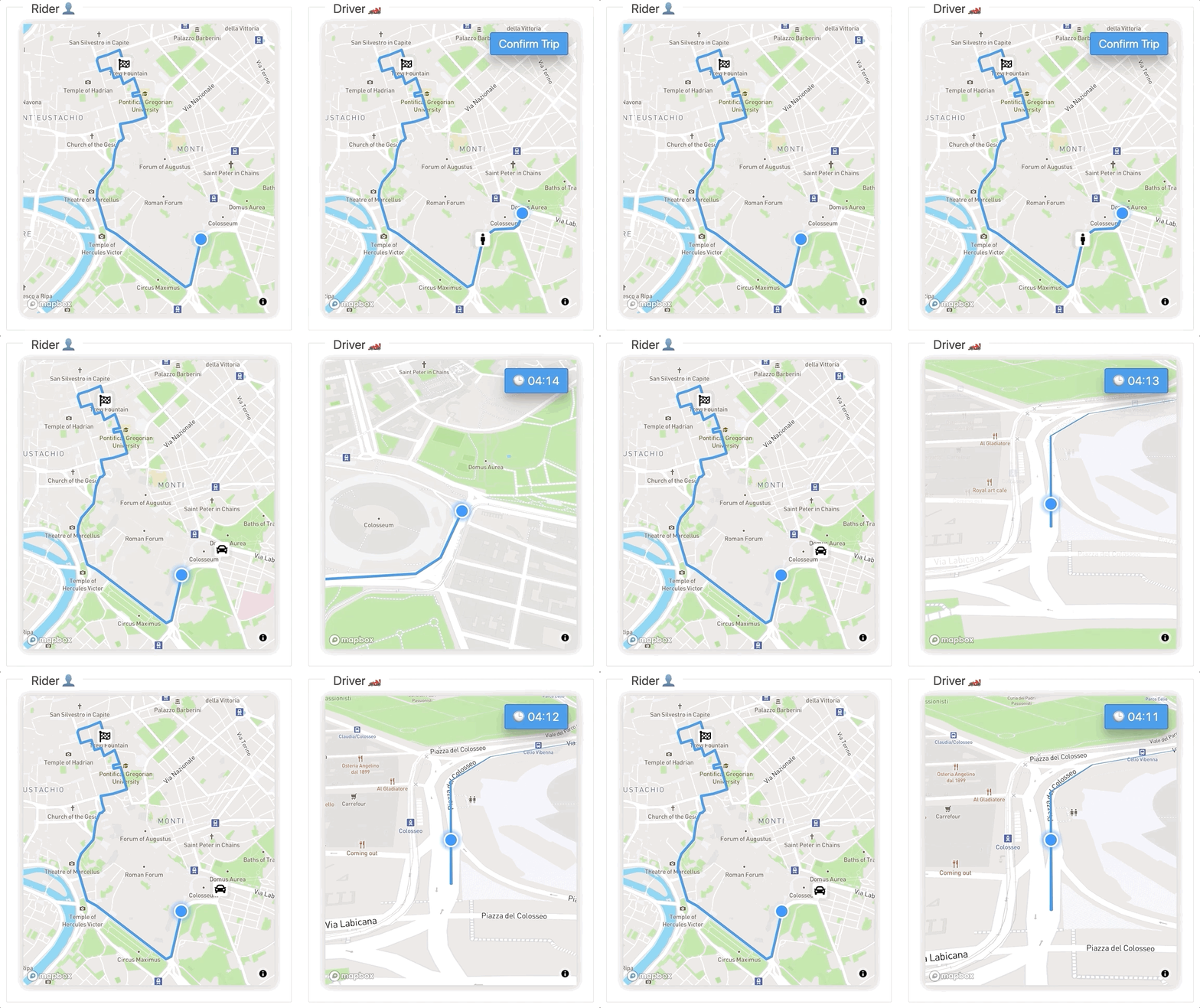
The rider has sent his trip request via REQUEST_TRIP action and the Driver clicking on `Confirm Trip` will confirm the trip sending CONFIRM_TRIP action.
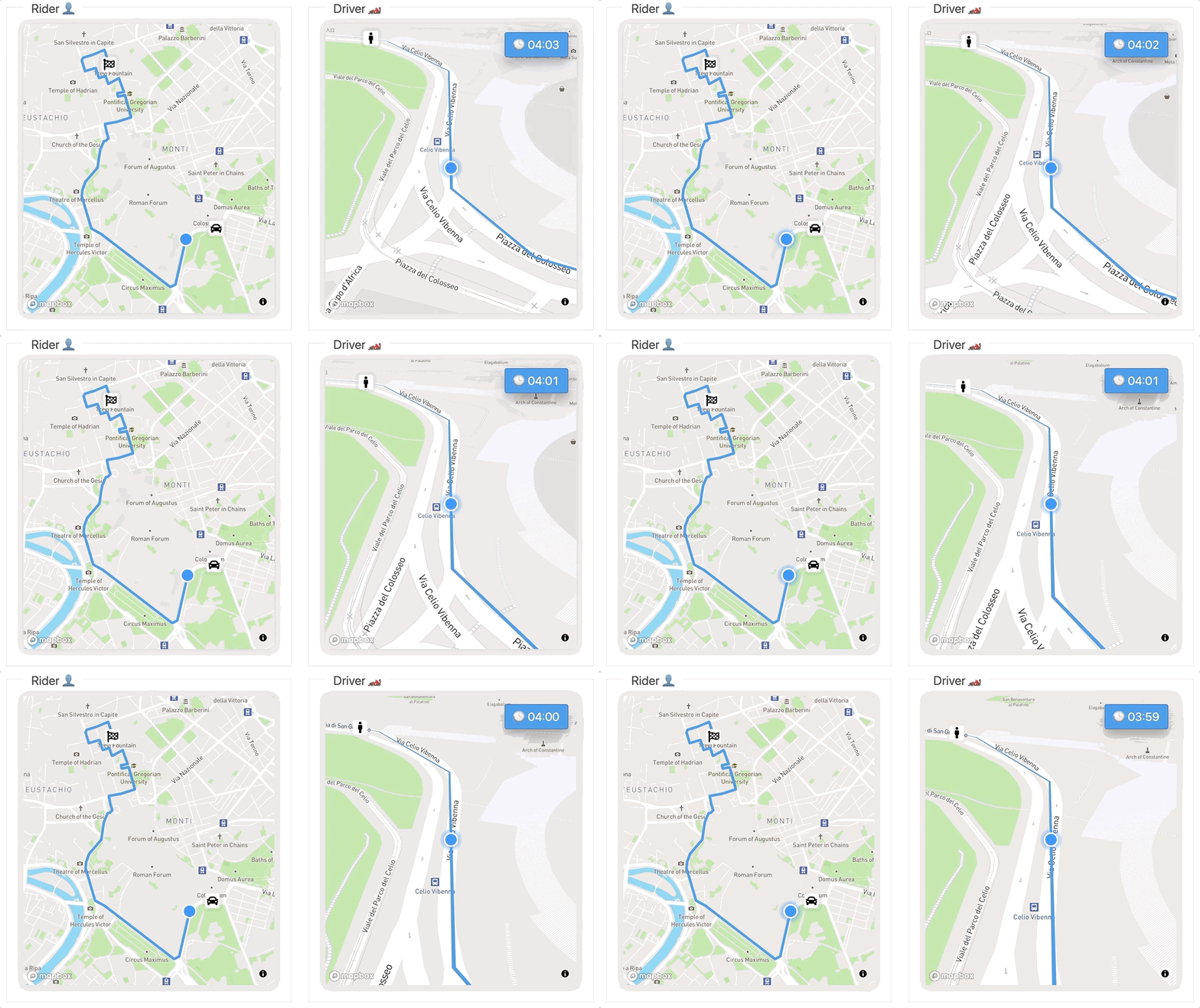
Driver keeps sending updates to the server via UPDATE_LOCATION. Riders show the latest updates.
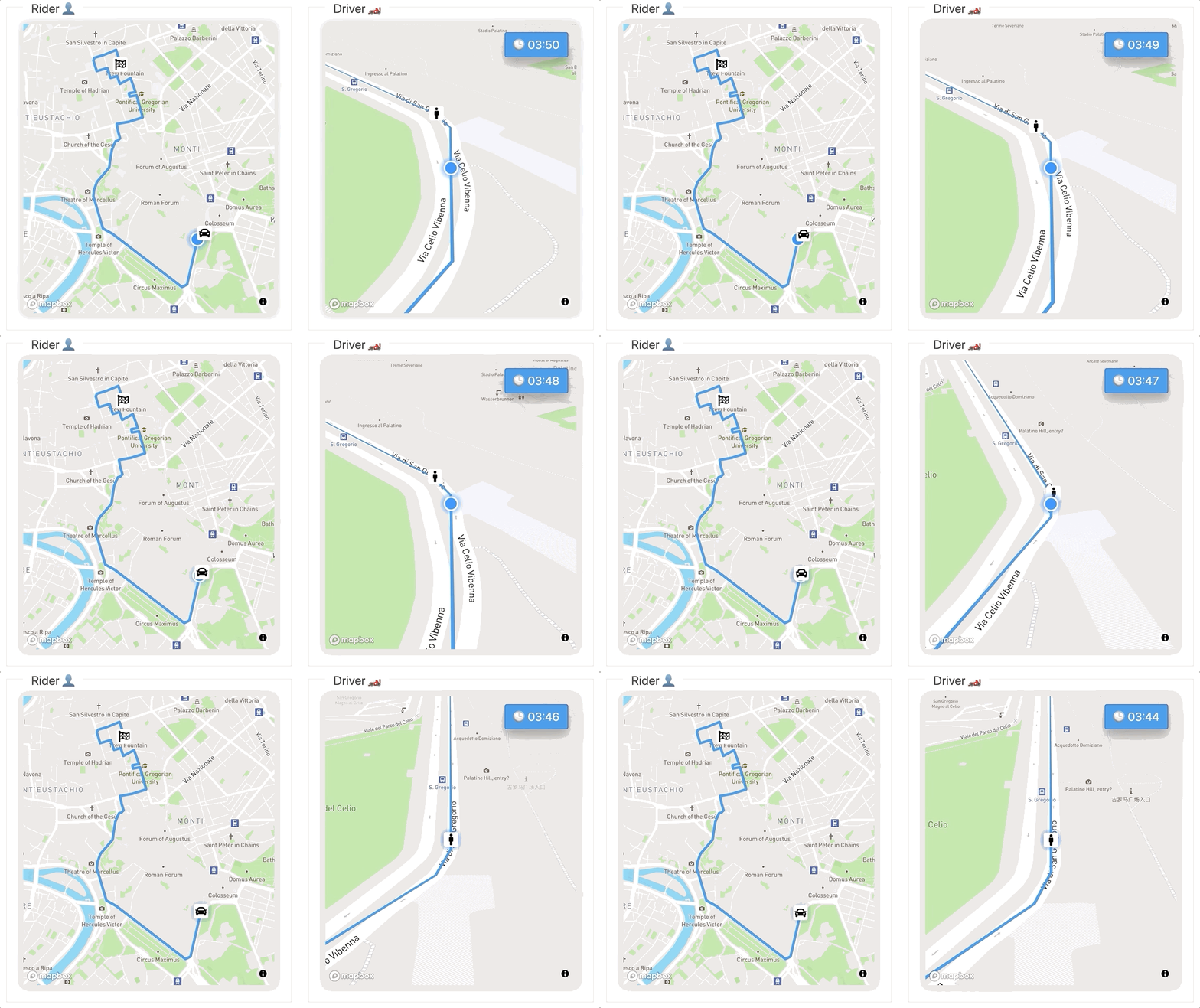
When the Driver is close enough, it can pick up the Rider and send START_TRIP.
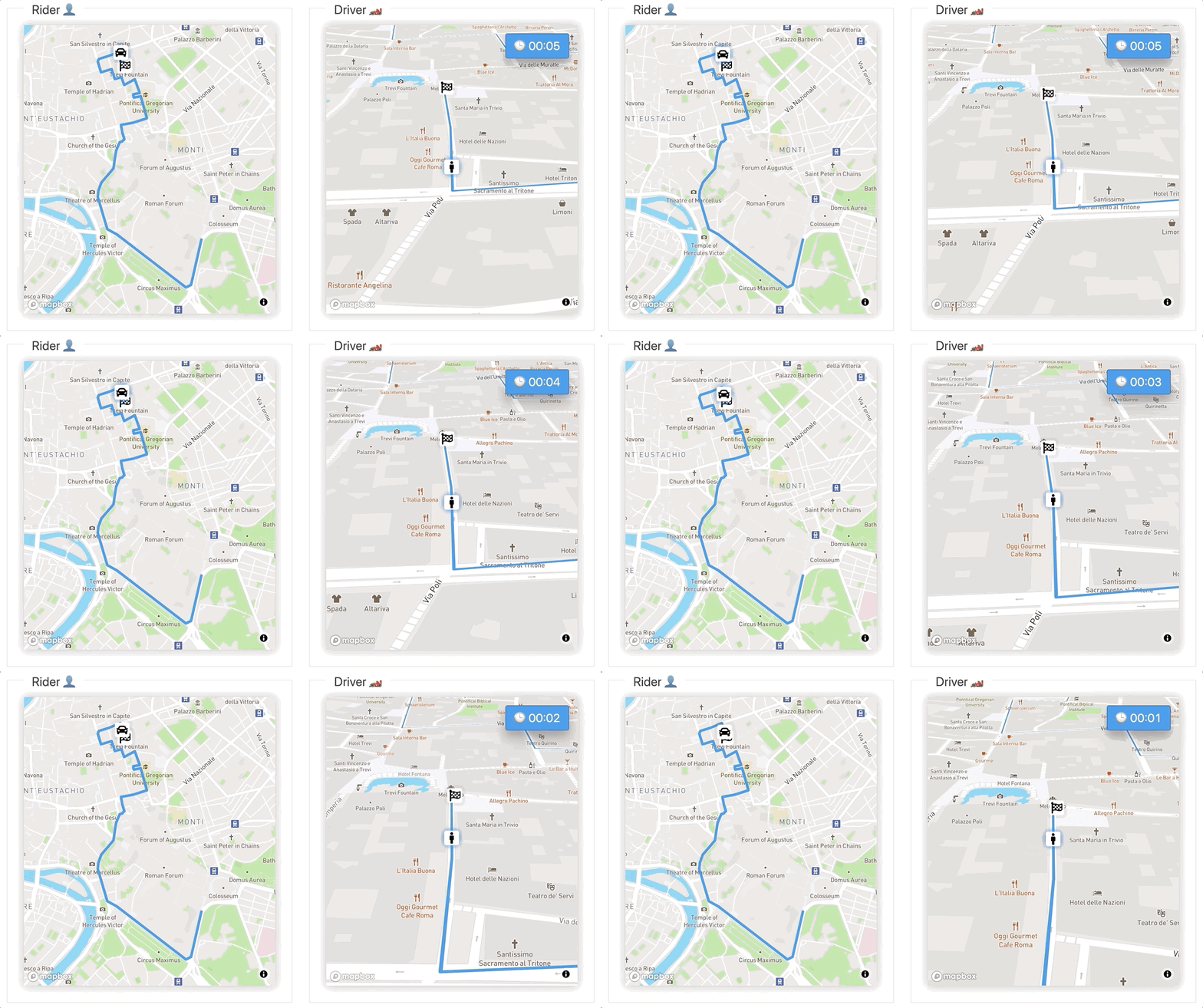
END_TRIP action called by Driver.
Conclusions and what I learned #
Svelte: From a developer experience point of view I expected something more, I would use it for quick demo and prototypes but in a day to day job feels like will cause some headaches. A big red flag is the default configuration documented in the website:
npx degit sveltejs/template my-svelte-project
cd my-svelte-project
npm install
npm run dev
does not fail if you misuse dependencies forcing you to check error at runtime. But the biggest downside is ….🥁(drum roll)…. missing Typescript support. Once you are .svelte land all typing get lost, I’ve tried some unofficial solutions but too much complicated for what in other libraries/frameworks just works™️.
What about VS code integration?
The official plugin does a basic job, but if you have other shiny helpers you use on your daily coding, they might need to be reconfigured to work with .svelte extension.
Mapbox: I used in the past several times, it is simple and effective, highly recommended.
Rxjs: Overkilling for this demo, no needs for cancellation mechanism or complex event aggregations. I should have just use Websocket , for the same reason I did not import axios in favour of fetch.
Full demo code here
Coding Interview Questions + Land Your Dev Job | Skilled.dev