On this page

Photo by Hosea Georgeson on Unsplash
Note: This is part of “Zero to Streaming Application”, learn about streaming applications building a POC. Full code here.
Motivation #
Learning something new is a positive way to spend the quarantine time we are force in 2020. I landed on this video on youtube and decided to learn more about streaming applications in general.
I decided to build a car sharing POC myself, where clients share informations in real time and messages are handled by Kafka topics. I also challenge myself by picking technologies I don’t use every day. This article is dedicated on the backend side of the POC.
Libraries/Technologies #
- Kotlin
- Spring Boot
- Kafka
- Kafka Steams
- Confluet docker containers
- Elassandra (Cassandra + Elasticsearch)
- Kibana
Architecture #
We are going to implement a full streaming application end to end with a bit of analytics to have visibility on the data produced.
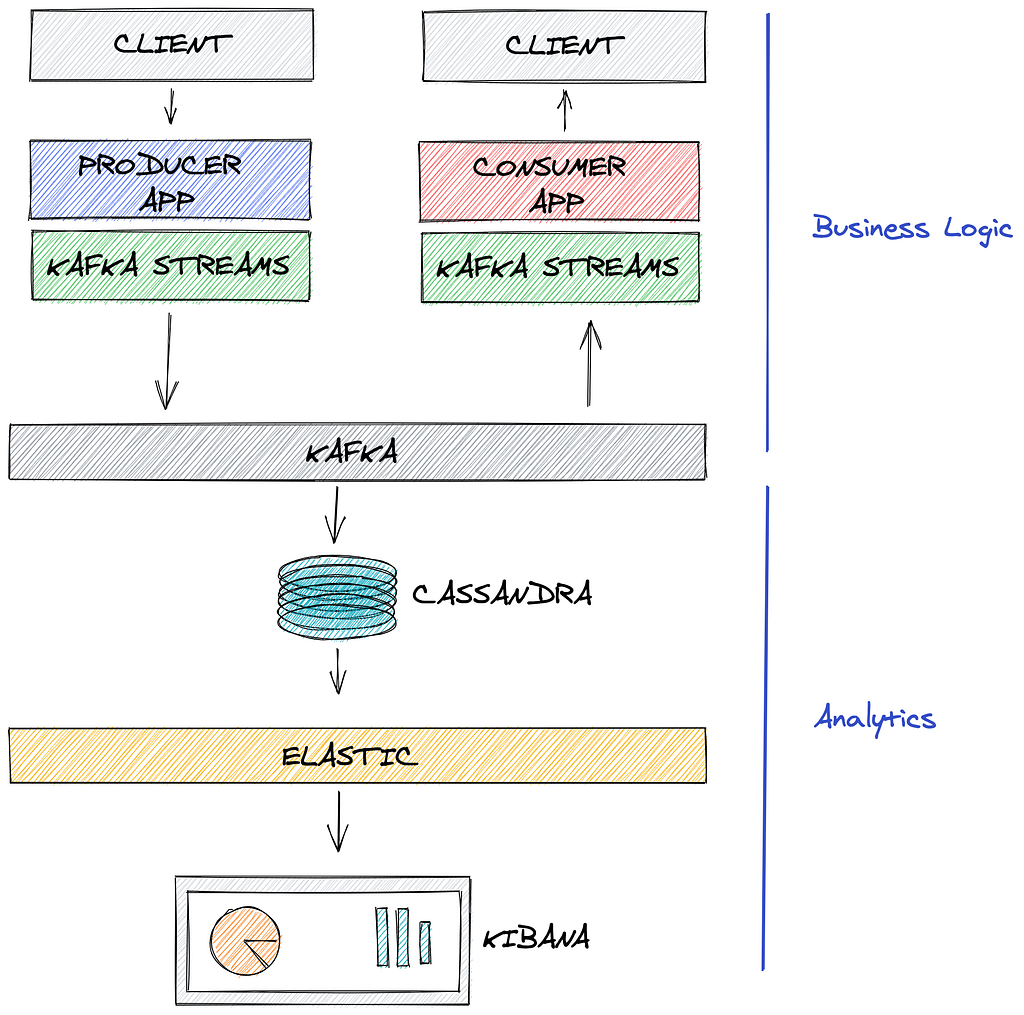
High level architecture. Thanks to https://excalidraw.com/ for diagram tool
We can split the architecture in the two parts where the first contain business logic and provide value to the connected clients, while the second one consume the same events in the platform and feed the analytics pipeline.
Kafka is the single source of that glue the 2 systems together.
Project structure #
backend
    └── main
        └── kotlin
            └── com
                └── kafkastreamsuber
                    └── kafkastreamsuber
                        ├── Constants.kt
                        ├── KafkaStreamsUberApplication.kt
                        ├── Utils.kt
                        ├── cassandra
                        │   ├── CassandraConfig.kt
                        │   └── keyspace
                        │       ├── trip
                        │       │   ├── TripCassandraConfig.kt
                        │       │   └── TripRepository.kt
                        │       └── user
                        │           ├── UserCassandraConfig.kt
                        │           └── UserRepository.kt
                        ├── kafka
                        ├── Consumer.kt
                        │   ├── Producer.kt
                        │   └── Store.kt
                        ├── models
                        │   ├── Action.kt
                        │   ├── Location.kt
                        │   ├── Trip.kt
                        │   └── User.kt
                        ├── serde
                        │   ├── TripSerde.kt
                        │   └── UserSerde.kt
                        └── ws
                            ├── WSDriver.kt
                            └── WSRider.kt
Handling Client Connection #
Clients connections are handled by WSDriver.kt for drivers and WSRider.kt for riders. The Main responsibilities here are:
- validate and collect client messages
public override fun handleTextMessage(session: WebSocketSession, textMessage: TextMessage) {
    val jsonString = textMessage?.payload.toString()
    val driverId = session?.attributes?.get("driverId") as String
    val action: Action = try {
        jsonParser.readValue(jsonString, Action::class.java)
    } catch (_: java.lang.Exception) {
        return
    }

    when (action.type) {
      ACTION_TYPE.UPDATE_DRIVER_LOCATION -> {
        if (action.payload == null)
          throw Error("Missing Location Payload")
        val location = jsonParser.readValue(action.payload, Location::class.java)
        var driver = store.getUser(driverId) ?: return
        driver.location = location
       producer.produceUser(driver)
    }
    ...other message types
}
- propagate messages to Kafka topics via producer Kafka Producer Class
@Autowired
private lateinit var producer: Producer
...
producer.produceUser(driver)
- interrogate Kafka store to provide latests status via Kafka Store Class
@Autowired
private lateinit var store: Store
...
store.getUser(driverId)
- send a message to a client keeping track of the user session.
private fun emit(session: WebSocketSession, msg: Action) =
        session.sendMessage(TextMessage(jacksonObjectMapper().writeValueAsString(msg)))

fun sendMessage(driverId: String, msg: String) {
    val session = sessionList[driverId]
    if (session === null || !session.isOpen) return
    synchronized(session) { session.sendMessage(TextMessage(msg)) }
}
Kafka #
A distributed streaming platform that allows publish*,* subscribe, process and analyse events, has durability and ordering guarantee (only for partitions). This is what I learn online:
- A distributed streaming platform that organise data into topics
- A topic is a particular stream of data that have a unique name and is a collection of events stored disk and replicated
- Topics are split in partitions, more partitions => higher throughput
- Message rrder is guarantee within the partitions
- If all messages must be ordered within one topic then you will choose to have 1 partition
- If messages can be ordered per a certain property, set a consistent message key and use multiple partitions. Will achieve higher throughput
- Consumers read in parallel from partitions
- Consumer are grouped in groups, a partition is assigned to only 1 consumer and cannot be shared within the group
Kafka Streams #
Kafka Streams is a client library for building applications and microservices, where the input and output data are stored in Kafka clusters
Imagine you have a collection of data T and you want to transform it into S. The first lines of code that comes in my mind involve operators like map filter reduce. In a very simplified way, Kafka Streams allow you to run these operators using Kafka topics as input and produce others Kafka topics as output.
DSL: KStream and KTable #
Kafka streams extend the concept of topics introducing Stream (KStream) and Table (KTable). An event stream records the history of what has happened as a sequence of events, a table represents a particular the state. The former is immutable (as you can’t change the history), the latter is mutable (existing date can be updates with newer one). You can easily transform one into the other one and vice versa.
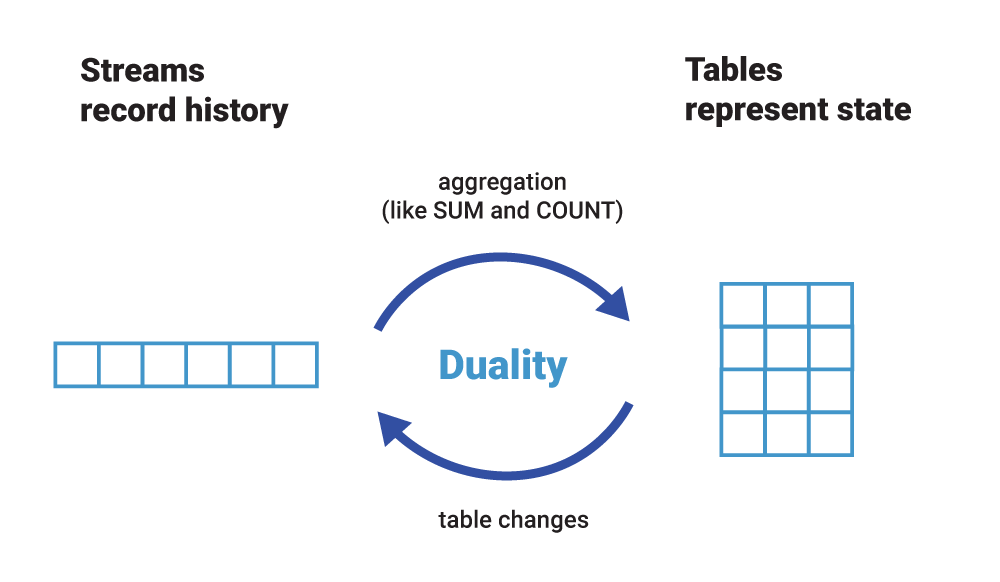
Stream Table duality from https://www.confluent.io/blog/kafka-streams-tables-part-1-event-streaming/
Queryable State Store #
The Kafka Streams API make it easy to query the state of your application. Once you have materialised the topic into a table you can simply expose that information using the InteractiveQueryService . For example you can materialise a KTable and look up a record count or last value for a particular topic.
Being Kafka a distributed system is very likely that the state could be split in separate machines. In this demo I only deal with 1 node but the API provide a way to discover state in the others nodes of the cluster as well.
Example #
Let’s see an example, in the following gist I process the user topic performing several steps:
@StreamListener(Consumer.Bindings.USER_TOPIC)
private fun processUsers(event: KStream<String, User>) {
    event
        .map { _, value -> KeyValue(value.id, value) }
        .groupByKey(Grouped.with(Serdes.String(), UserSerde()))
        .reduce({ _, new -> new }, Materialized.`as`(USER_STORE))
        .toStream()
        .filter { _, user -> user.type === UserType.DRIVER }
        .foreach { _, driver ->
            wsRider.sendMessageToRider(
                getRiderId(driver.id),
                JsonParser.writeValueAsString(buildUpdateLocationAction(driver))
            )
        }

    event
        .foreach { _, user ->
            try {
                userRepository.insert(UserEvent(user))
            } catch (e: Exception) {
                println(e)
            }
        }
We can notice 3 streams of work here:
- with map, groupByKey, reduce we can parse the stream, deserialise the user topic and materialise the users into a Kafka table (and make it queryable later on).
- toStream, filter, forEach allow me to filter only drivers and send the location updates to riders.
- forEach at root level stream allow me to iterate on every record and store is into the Cassandra db.
@Component
class Store {
    @Autowired
    private lateinit var queryService: InteractiveQueryService
    private var userStore: ReadOnlyKeyValueStore<String, User>? = null

    fun getUser(id: String): User? {
        return try {
            if (userStore == null) userStore = queryService?.getQueryableStore(USER_STORE, keyValueStore());
            userStore?.get(id)
        } catch (e: Exception) {
            LOGGER.error("User store error: $e")
            null
        }
    }
}
It is pretty interesting understanding what Kafka Streams is doing under the hood, here is a visualisation that represents the intermediate topics created for these operations:
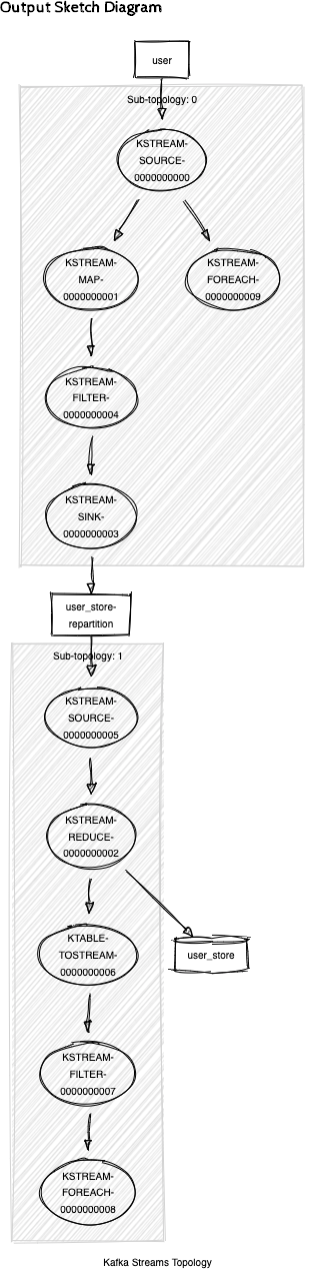
Kafka Streams topology for user processing.
You can get the topology in string format enabling logging.level.org.springframework.kafka.config=DEBUG in application.properties, than give it in input to https://zz85.github.io/kafka-streams-viz.
It is clear that this library does all the heavy lifting for us when comes to aggregate and manipulate streaming data coming from Kafka topics.
Spring Cloud stream #
First implementation of Kafka streams I tried involved the StreamsBuilder API mentioned in the documentation and example provided by the official docs.
This how looked like:
val streamsBuilder = StreamsBuilder()
val userStream: KStream<String, User> = streamsBuilder
    .stream(USER_TOPIC, Consumed.with(Serdes.String(), UserSerde())
val tripStream: KStream<String, Trip> = streamsBuilder
    .stream(TRIP_TOPIC, Consumed.with(Serdes.String(), TripSerde()))
userStream.groupByKey().reduce({ _, new -> new }, Materialized.`as`(USER_TABLE))        tripStream.groupByKey().reduce({ _, new -> new }, Materialized.`as`(TRIP_TABLE))
val topology = streamsBuilder.build()
streams = KafkaStreams(topology, props)
streams!!.start()
It worked very well and served his purpose, but I wanted to try a more ‘Springy’ way of binding topics with the code.
I read about Spring Cloud Stream and the ability to abstract the connection with the message system whatever is Kafka, RabbitMQ, AWS Kinesis or others, very cool let’s give a try.
Here is how the the connection with the topics looks like after the refactor and the specific binder for Kafka streams.
// Define binder in application.properties
spring.cloud.stream.bindings.input_1:
  destination: user
// Define binding interface for specific topic key. "input) is default
internal interface Bindings {
    @Input("input_1")
    fun user(): KStream<String?, User>?
}
// EnableBinding for your consumer
@EnableBinding(Consumer.Bindings::class)
class Consumer {
  // Choose Functional or Imperative
  @StreamListener(Consumer.Bindings.USER_TOPIC)
  private fun processUsers(event: KStream<String, User>) {
    event.map ....
For the data production I followed the same pattern and here is what looks like with spring could stream.
// 1 - Define binder in application.properties
spring.cloud.stream.bindings.output_1:
  destination: user
// 2 - Define binding interface
internal interface Bindings {
    @Output("output_1")
    fun output_1(): MessageChannel
}
// 3 - EnableBinding for your producer
@EnableBinding(Producer.Bindings::class)
  // 4 - Produce
  fun produceUser(user: User) {
    output_1.send(MessageBuilder.withPayload(user).build())
  }
I had 2 issue with this library:
- MessageBuilder interface does not provide an easy way yo set a message key. I used the User.uid as key anyway as workaround when reading from the stream.
- I lost some time setting the serialisation/deserialisation of data, I did not fully understand the configuration of that part.
Overall I think a cleaner implementation then first pass.
Cassandra spring boot #
I hoped managing Cassandra in SpringBoot was a lot simpler, going back I would probably choose another DB, these are the areas where I struggled the most:
- Multi Keyspace Support
- Schema Creation
As I wanted the data stored to be searchable and retrievable from a BI tool I went to try Elassandra which provide a Cassandra+Elasticsearch already implemented.
The Architecture of Elassandra force me to create 1 Cassandra Keyspace per Elasticsearch index, which lead me to the implementation of managing multiple keyspaces in the spring application.
Here is the solution, abstract config for the general Cassandra properties:
package com.kafkastreamsuber.kafkastreamsuber.cassandra

import org.springframework.beans.factory.annotation.Value
import org.springframework.data.cassandra.config.AbstractCassandraConfiguration
import org.springframework.data.cassandra.config.CassandraClusterFactoryBean
import org.springframework.data.cassandra.config.CassandraCqlClusterFactoryBean
import org.springframework.data.cassandra.config.SchemaAction

abstract class CassandraConfig : AbstractCassandraConfiguration() {
    val geoPointType: String = "geo_point"

    @Value("\${cassandra.contactpoints}")
    private val contactPoints: String? = null

    @Value("\${cassandra.port}")
    private val port = 0

    override fun getContactPoints(): String {
        return contactPoints!!
    }

    override fun getSchemaAction(): SchemaAction {
        return SchemaAction.NONE
    }

    override fun getPort(): Int {
        return port
    }

    override fun cluster(): CassandraClusterFactoryBean {
        val cluster = CassandraCqlClusterFactoryBean()
        cluster.setJmxReportingEnabled(false)
        return cluster
    }
}
Dedicated config for each keyspace subfolder with *CassandraTemplate Bean for user session.
“User_event” example:
package com.kafkastreamsuber.kafkastreamsuber.cassandra.keyspace.user

import com.kafkastreamsuber.kafkastreamsuber.cassandra.CassandraConfig
import org.springframework.beans.factory.annotation.Qualifier
import org.springframework.context.annotation.Bean
import org.springframework.context.annotation.Configuration
import org.springframework.data.cassandra.config.CassandraSessionFactoryBean
import org.springframework.data.cassandra.core.CassandraAdminOperations
import org.springframework.data.cassandra.core.CassandraAdminTemplate
import org.springframework.data.cassandra.repository.config.EnableCassandraRepositories

@Configuration
@EnableCassandraRepositories(cassandraTemplateRef = "UserCassandraTemplate")
class UserCassandraConfig : CassandraConfig() {
    private val keyspace: String = "user_event"

    override fun getKeyspaceName(): String {
        return keyspace
    }

    @Bean("UserSession")
    override fun session(): CassandraSessionFactoryBean {
        val session = super.session()
        session.setKeyspaceName(keyspaceName)
        return session
    }

    @Bean("UserCassandraTemplate")
    fun cassandraTemplate(@Qualifier("UserSession") session: CassandraSessionFactoryBean): CassandraAdminOperations? {
        return CassandraAdminTemplate(session.getObject(), cassandraConverter())
    }
}
Repository in the keyspace subfolder.
@Repository
interface UserRepository: CassandraRepository<UserEvent, String>
@EnableCassandraRepositories on the configuration file and @Repository in the repository situated in the subfolder will enable multi keyspace connections.
For the schema creation I was hoping to use the spring-data-cassandra annotations @Table to enable auto creation but maybe the multi keyspace made my life a bit harder and the auto-creation did not work at all. I implemented then the schema creation via cql script. More details in the Infra part.
Elassandra #
As I mention before, I planned to use Elasticsearch and Kibana to get insight on the data generated. My first approach involved a topic between Cassandra tables and elastic search indexes, so that I was decoupling as much as possible between data store and analytics part.
Cassandra ============ kafka topic ==============> Elasticsearch
but then I discovered elassandra.io, they have done all the hard work of connecting Elasticsearch indexes to Cassandra keyspaces. I decided to gave it a go.
Elassandra documentation - Elassandra 6.8.4.5 documentation
Create Elastic search index from Cassandra Table #
Now that we all the data coming through the DB we want to search and visualise data patterns in Kibana, the first step is creating an Elasticsearch index that map directly with the Cassandra table.
Elassandra supports a parameter “discover” in the mapping api that creates an Elasticsearch index connected directly with the Cassandra table.
Here is the creation of the user_event and trip_event index:
-- create user index
PUT /user_event
{
  "mappings": {
    "user_event": {
      "discover": "^((?!location).*)",
      "properties": {
        "location": {
          "type": "geo_point"
        }
      }
    }
  }
}
-- create trip index
PUT /trip_event
{
  "mappings": {
    "trip_event": {
      "discover": "^((?!location).)*$",
      "properties": {
        "from_location": {
          "type": "geo_point"
        },
        "to_location": {
          "type": "geo_point"
        }
      }
    }
  }
}
location is an object with lat and lon coordinates, by default Elassandra does not recognise the UDT (User Define Type) geo_point even if I called GEO_POINT, but it can be excluded from the auto-mapping and mapped manually.
Elassandra define Cassandra columns as List<type> when auto map indexes from Elastic, did not understand fully why. I followed their pattern when I’ve created my tables. would be interesting to see if regular type columns works just fine.
Kibana #
Once the Elasticsearch index are up and running the last thing is missing to configure are the index-pattern that allow Kibana to interface with Elasticsearch. This can be done manually from the UI or via rest endpoint. I configured these steps at the startup of the application.
curl -XPOST “http://localhost:9200/.kibana/doc/index-pattern:trip_event" -H ‘Content-Type: application/json’ -d’
{
 “type” : “index-pattern”,
 “index-pattern” : {
 “title”: “trip_event*”,
 “timeFieldName”: “timestamp”
 }
}'
curl -XPOST “http://localhost:9200/.kibana/doc/index-pattern:user_event" -H ‘Content-Type: application/json’ -d’
{
 “type” : “index-pattern”,
 “index-pattern” : {
 “title”: “user_event*”,
 “timeFieldName”: “timestamp”
 }
}'
N.B. You need to have some data in the elastic indexes for the Kibana mapping to work. It Is better to create them manually when you land in the Kibana UI. It is less error prone.
And here a Kibana Dashboard up and running:
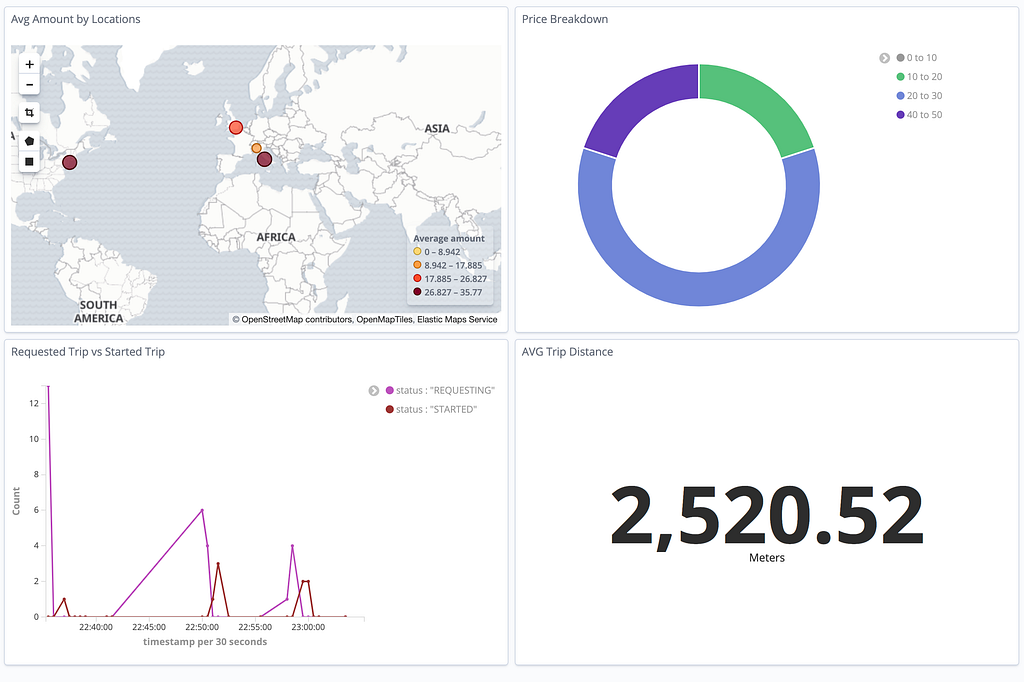
Kibana insights built on top streaming data.
Code review, conclusions and what learned #
Kotlin: It feels like a younger version of Java. Very flexible, I love how deals with nullables and Intellij does a great job to translate Java snippets code into Kotlin, that improves first time experiences with the language.
Kafka: I did not run a production architecture, so was a fairly simple configuration to manage. Confluents containers comes with monitor dashboard that a lot helps understand how messages flows in the topic without additional inspection tools.
Kafka-streams: Feels like a great choice to handle events transformation, it does all the heavy lifting creating intermediate topic for you. No separate cluster processing, run in your application code, which is quite cool.
Spring Boot + Gradle: https://start.spring.io/ does pretty much all the job at the start, but was interesting learning how vast the framework is. There is probably a Spring suggested implementation for pretty much all the common problems out there (ex. cloud-stream approach vs Kafka low level api)
Cassandra: Choosing Elassandra wrapper did not give me the full picture of it. Would be nice to try it in the future with a more standard connector that expose the changes to Kafka topics. I did found many issue with multi-tenancy, not very easy to deal in the Spring Boot realm for Cassandra.
Elassandra: Provide real benefit extending the search capability of regular sql like language, but I would expect some limitations. You can’t obviously upgrade separately Cassandra or Elasticsearch.
Full demo code here
References: #
Introduction to Apache Kafka by James Ward — https://www.youtube.com/watch?v=UEg40Te8pnE
What is Apache Kafka®? — https://www.youtube.com/watch?v=_q1IjK5jjyU
Kafka Streams — https://docs.confluent.io/current/streams/index.html
Kafka Topics, Partitions and Offsets Explained — https://www.youtube.com/watch?v=06iRM1Ghr1k
How to achieve strict ordering with Apache Kafka? — https://www.cloudkarafka.com/blog/2018-08-21-faq-apache-kafka-strict-ordering.html
Separate keyspaces with Spring Data Cassandra — https://lankydan.dev/2017/10/22/separate-keyspaces-with-spring-data-cassandra