On this page

Photo by Colton Duke on Unsplash
Note: This is part of “Zero to Streaming Application”, learn about streaming applications building a POC. Full code here.
Intro #
In this part I’ll list the containers used in the POC, and few automation steps required for the schema creation. I did not went further and deploy the cluster, but it is worth to mention I’ve tested Github Actions running CI on FE and BE build.
Containers #
version: "2"
services:
  zookeeper:
    image: confluentinc/cp-zookeeper:5.4.1
    broker:
      image: confluentinc/cp-server:5.4.1
    control-center:
      image: confluentinc/cp-enterprise-control-center:5.4.1

    elassandra:
      image: "docker.io/strapdata/elassandra:6.8.4.3"
    kibana:
      image: docker.elastic.co/kibana/kibana-oss:6.8.4
    schema-init:
      container_name: schema-init
      build: ./schema-init
Confluent #
Confluent is a platform to build on top Kafka and his connectors ecosystem, I consumed a lot of there documentation and I ended up using their docker containers. The following is the Confluent Control Center, very handy to monitor the cluster health and check topics details, even at message level.
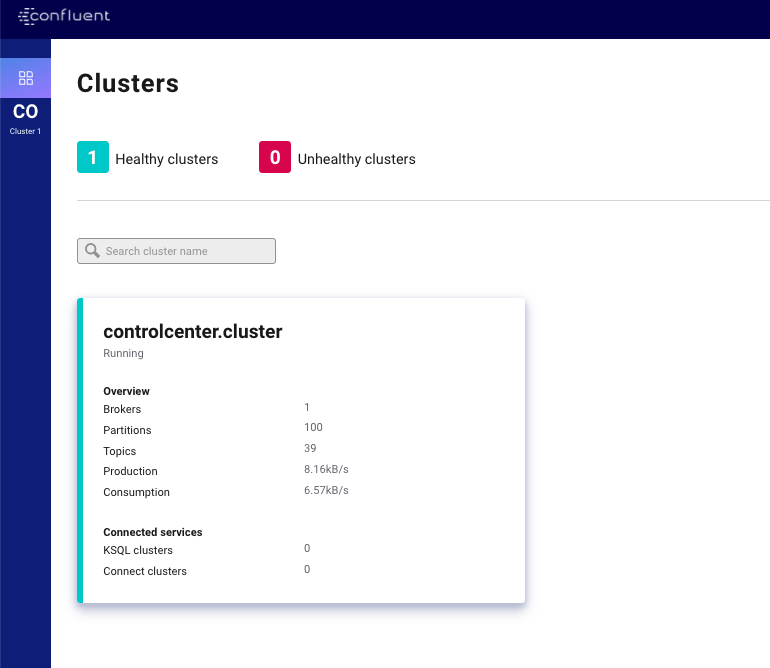
Confluent Center Cluster Dashboard from the POC, accessible at http://localhost:9021
Schema-init #
As I mention in the previous article, dealing with Cassandra multi tenancy was not a not an easy task, I struggled to get schema creation right for multiple keyspaces. I decided then to changes my approach and implement a container dedicated for Cassandra schema and elastic indexes initialisations.
Here is how the docker-entry.sh looks like:
#!/bin/bash
set -e

# Helpers
function wait() {
  until [[ $(curl "$1/_cat/health?h=status" --silent) == 'green' ]]; do
    echo "Waiting for "$2"..."
    sleep 5
  done
}

# check elassandra is up
wait "$ELASTIC_URL" "elastic"

# Cassandra schema
cqlsh --cqlversion=3.4.4 $CASSANDRA_HOST -f /tmp/cassandra-schema.cql

# Elastics Indexes
curl -XPUT "$ELASTIC_URL/user_event" -H 'Content-Type: application/json' -d'
{
  "mappings": {
    "user_event": {
      "discover": "^((?!location).*)",
      "properties": {
        "location": {
          "type": "geo_point"
        }
      }
    }
  }
}'
curl -XPUT "$ELASTIC_URL/trip_event" -H 'Content-Type: application/json' -d'
{
  "mappings": {
    "trip_event": {
      "discover": "^((?!location).)*$",
      "properties": {
        "from_location": {
          "type": "geo_point"
        },
        "to_location": {
          "type": "geo_point"
        }
      }
    }
  }
}'

# NB: this does not work if indexes are empty
# Kibana Index Mapping
# curl -XPOST "$ELASTIC_URL/.kibana/doc/index-pattern:trip_event" -H 'Content-Type: application/json' -d'
# {
# "type" : "index-pattern",
#  "index-pattern" : {
#  "title": "trip_event*",
#  "timeFieldName": "timestamp"
#  }
# }'
# curl -XPOST "$ELASTIC_URL/.kibana/doc/index-pattern:trip_event" -H 'Content-Type: application/json' -d'
# {
# "type" : "index-pattern",
#  "index-pattern" : {
#  "title": "trip_event*",
#  "timeFieldName": "timestamp"
#  }
# }'

echo "Done."
As you can see, checking for elastic up does all the trick (thanks for Elassandra that manage all that). Once Elasticsearch and Cassandra are up we can run the cql script and create the elastic indexes. You can spot in the comment part that there is automation for Kibana as well, but if the Elastic indexes are empty that won’t work, you would need to create manually from the Kibana UI (very easy step)
DROP KEYSPACE IF EXISTS user_event;
DROP KEYSPACE IF EXISTS trip_event;

CREATE KEYSPACE user_event WITH replication = {'class': 'NetworkTopologyStrategy', 'DC1': 1} AND durable_writes = true;
CREATE KEYSPACE trip_event WITH replication = {'class': 'NetworkTopologyStrategy', 'DC1': 1} AND durable_writes = true;

CREATE TYPE user_event.geo_point (lat DOUBLE, lon DOUBLE);
CREATE TYPE trip_event.geo_point (lat DOUBLE, lon DOUBLE);

CREATE TABLE user_event.user_event (
  uid TEXT PRIMARY KEY,
  timestamp LIST<TIMESTAMP>,
  user_uid LIST<TEXT>,
  location LIST<FROZEN<GEO_POINT>>,
  user_type LIST<TEXT>,
  last_trip_id LIST<TEXT>
);

CREATE TABLE trip_event.trip_event (
  uid TEXT PRIMARY KEY,
  timestamp LIST<TIMESTAMP>,
  status LIST<TEXT>,
  driver_id LIST<TEXT>,
  rider_id LIST<TEXT>,
  from_location LIST<FROZEN<GEO_POINT>>,
  to_location LIST<FROZEN<GEO_POINT>>,
  amount LIST<DOUBLE>,
  distance LIST<DOUBLE>
);
Github Actions #
I also tried a very simple CI with Github Actions, it is very promising for a developer point of view, everything is already there, no need to connect the X CI Service anymore. Commits are marked as pending/running jobs and there is even badges build/test generation for Readme files. The workflow builder has a very handy autocomplete with description, but I won’t be surprised if they will end up building a workflow builder to manage step dependencies and visualise a pipeline flow.
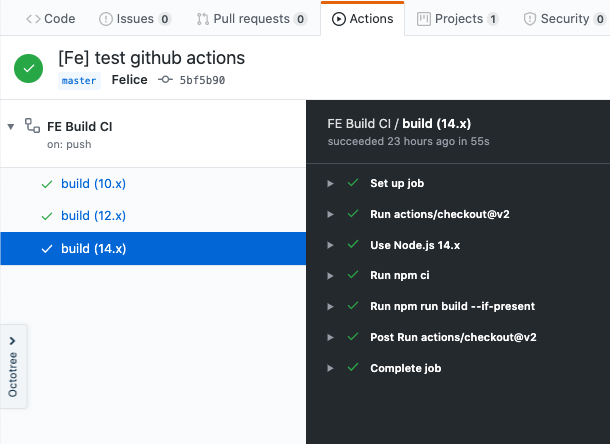
Github Actions in “action”
Conclusion #
All I learned is very far away from a real production environment but is nice get a the feeling at what a streaming architecture looks like. If you want to learn it, built something with it
Full demo code here